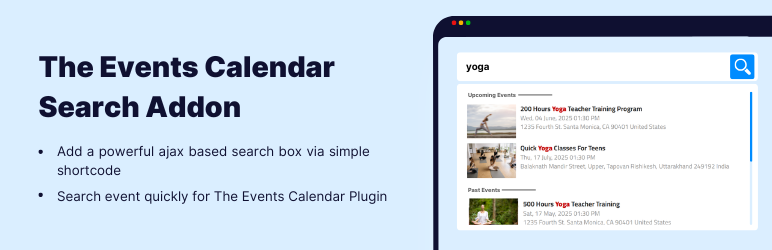

Description
Give your visitors a real way to find events instead of scrolling a long event calendar.
Events Search & Filter Bar is a free event search plugin and events filter bar for The Events Calendar. Visitors type an event name, narrow it to a date range, and see matching events on the same page — with a shareable URL for every filtered view.
Front-end event search and filtering is normally a paid feature in the events calendar ecosystem. This event calendar addon gives you a real, working one for free.
An events calendar addon, not another event calendar plugin
This plugin does not replace your WordPress event calendar — it makes the one you already have findable. If you run The Events Calendar to manage events, conferences, webinars, workshops, classes, gigs or local meetups, and your events page has grown into a long list, this adds the search and filtering layer that list is missing.
It works on any WordPress site running The Events Calendar (free or Pro), with any theme, and with the block editor, Elementor, Divi, Beaver Builder, Bricks and WPBakery — because the bar is placed with a simple shortcode.
What you get, free
- Event search that runs on the server. Keyword search matches the event title, paginated and bounded — your event catalogue is never dumped into the browser.
- Type-ahead event suggestions. Instant results as visitors type, in a keyboard-driven dropdown — and, when the bar has a results list to hand them to, a “See all results” row that takes them there.
- A date filter with presets. Today, Tomorrow, This weekend, This week, Next week, This month, Next month — or a custom date range. Multi-day and recurring events are matched correctly, in your site’s timezone.
- Filtered event lists on the same page. Place the results region where you want it and the bar drives it — event count, active-filter chips, Load more, and helpful empty states that offer a way out (“Clear search”, “Search past events too”, “Browse past events”).
- Events grid or events list, the visitor’s choice. Pick the default; visitors can flip between the two from the results toolbar, and re-sort — soonest first, latest first, or by title.
- Event cards you control. Show or hide the image, title, date, venue and cost, set the number of columns and the card scale, and choose how the event date reads.
- Shareable, bookmarkable URLs. Every search, date range, sort and page is in the address bar, so a filtered event view can be linked, shared and crawled — and the browser’s back and forward buttons behave.
- Put your search bar on the default events page. On The Events Calendar’s List view, swap out its search box, its List/Month/Day links and its date navigation, and put your bar there instead. It keeps rendering its own event results — your search and date filter drive them.
- Add a heading to the events page. The events archive is not a normal WordPress page, so there is nowhere obvious to title it. Type one line and it appears above the bar; leave it blank and nothing changes.
- Make it match your site. Accent, text and background colours (six ready-made palettes, including two dark ones), two bar frames, six search-button treatments, a control-size scale and a corner-radius slider. A theme-proof control reset keeps the bar clean on themes that restyle every input.
- Accessible by design. A proper combobox/listbox keyboard pattern, focus that never leaves the input while arrowing through suggestions, polite screen-reader announcements — and a plain form fallback that still searches with JavaScript switched off.
- Light on your site. Event queries are cached, public requests are rate-limited, and the CSS and JS load only on pages that actually render a bar.
Add the event search bar with a shortcode
Drop this on any page, post or widget area:
[events-calendar-search]
Out of the box that’s an event search box with type-ahead suggestions. Turn on the date filter and a results region in the settings panel, and the panel writes the shortcodes for you — including the second tag that marks where the filtered event list appears:
[events-calendar-search facets="search,date" results-mode="inline" target="events"]
[events-calendar-search-results target="events"]
You never have to type either by hand. Design the bar in the panel, then copy both tags with one click.
Shortcode attributes
Every attribute below is optional. Leave one out and it inherits your saved setting, so a bare [events-calendar-search] follows the settings panel and you only add an attribute where one placement should differ.
[events-calendar-search] — the search bar
What the bar contains and does
facets— which filters the bar shows.search,date, orsearch,date. Category, tag, venue, organizer and location filters are Pro.search-fields— which field the keyword matches.title. Description, venue name and organizer name are Pro.typeahead— the suggestions dropdown.dropdown(default) oroff.results-mode— where events appear.inline(a results block on this page) ornone(dropdown suggestions only). A separate results page is Pro.target— an id that links this bar to its results region, e.g.target="events". Use the same value on both shortcodes.filters-visibility— where the filters sit.expanded(all options on show, the default) orbar_inline(inside the bar’s keyword row). Behind a Filters button, or permanently below the bar, are Pro.filter-style— how a filter trigger looks.text. Pill, dropdown and filled styles are Pro.placeholder— the text inside the empty search box.
How the bar looks
bar-template— the bar frame.unified(default, one joined bar) ordetached(separate field and button).button-style— the search button.solid_icon(default),solid,outline,icon,textornone.accent-color,text-color,bg-color— hex colours, e.g.accent-color="#0f766e".control-size— the control scale as a percentage,80–140(default100).corner-radius— corner rounding in pixels,0–24(default8).
The event list
view—grid(default) orlist.per-page— events per page,1–50(default12).columns— grid columns,2–5(default3).card-size— card scale as a percentage (default100).card-fields— which parts of an event card show, fromimage,title,date,venue,cost, e.g.card-fields="image,title,date".date-format— how the event date reads.site(default, your WordPress format),long,medium,dmyoriso.template— the card design.clean. The Modern card design is Pro.
[events-calendar-search-results] — a standalone event list
Place this wherever the filtered events belong; it shares state with the bar through target. It accepts target, view, per-page, facets, search-fields, columns, card-size, card-fields, date-format, template, accent-color, text-color, bg-color, control-size and corner-radius — the same values as above.
Examples
A search box on its own, no event list:
[events-calendar-search results-mode="none"]
A search box with a date filter, and the event list below it in a two-column grid:
[events-calendar-search facets="search,date" results-mode="inline" target="events"]
[events-calendar-search-results target="events" view="grid" columns="2"]
A compact bar in a sidebar widget, matching your brand:
[events-calendar-search bar-template="detached" button-style="icon" accent-color="#0f766e" control-size="90"]
Events as a plain list, 24 per page, showing only title and date:
[events-calendar-search-results target="events" view="list" per-page="24" card-fields="title,date"]
Upgrading from version 1.x? The old layout, show-events, disable-past-events and content-type attributes are still accepted and mapped onto the new engine, so shortcodes already published on your site keep working untouched.
Events Search & Filter Bar Pro
Everything above is free and stays free. If you need more than a keyword box and a date filter, Events Search & Filter Bar Pro adds:
- Wider event search — match event description, venue name and organizer name, not just the title.
- More event filters — category, tag, venue and organizer facets.
- A location filter in the bar — match city, state/region or country from your venues.
- More filter placements — behind a “Filters” button, or permanently below the bar, plus pill, dropdown and filled trigger styles.
- A separate events search results page — send the bar’s submissions to a dedicated page instead of a region on the same one.
- The Modern card design — a date badge on the event image.
- Full takeover of the events page — replace The Events Calendar’s List view with your bar and your event results, instead of swapping only its controls.
Pro keeps the same shortcodes, the same settings and the same CSS class names, so upgrading doesn’t mean editing your pages.
More Addons To Enhance Your Events Website
If you are using The Events Calendar plugin to manage events, conferences, webinars, workshops, or local meetups, you can extend its functionality with professional event calendar addons built specifically for event websites. These addons help you improve event layout design, event listing display, search and filtering options, and overall event management on your WordPress website.
-
Event Single Page Builder for The Events Calendar:
Replace the default event template with a fully custom single event page. Design professional event pages using Elementor and showcase event schedule, venue details, maps, speakers, sponsors, ticket booking buttons, countdown timers, and call-to-action sections. You can also use it on non-Elementor websites using ready-made templates. -
Events Widgets for Elementor:
Looking for an event widget for Elementor? This addon provides widgets to show event list, grid, and carousel. You can display events in different layouts and customize event meta fields such as date, venue, organizer, and ticket links. -
Events Shortcodes for The Events Calendar:
Display events anywhere on your website using flexible shortcodes. Show upcoming events, past events, featured events, or category-based event listings in list, grid, slider, timeline, masonry, accordion, and more.
-
Events Speakers & Sponsors:
Add dedicated speakers and sponsors sections inside your event pages. Showcase keynote speakers, guest presenters, partners, and sponsors with structured layouts to increase credibility and improve event promotion. -
Events Calendar Modules for Divi:
Using Divi theme? Display The Events Calendar events inside Divi Builder using custom event modules and create stylish event list and grid layouts.
Some Other Cool Plugins
- Timeline Widget for Elementor: Create vertical and horizontal timelines inside Elementor.
- Cool FormKit: Add advanced fields and features to Elementor forms.
- AutoPoly: Polylang addon to automatically translate WordPress pages and posts using AI.
- LocoAI: Translate WordPress plugin strings inside Loco Translate using an AI translator.
- Cryptocurrency Widgets: Display live cryptocurrency prices, charts, and market data.
Third-Party Services: This plugin contacts an external server in exactly two situations, both optional and both requiring your consent: the usage-tracking check-in, which runs only after you opt in and stops when you opt out; and the short feedback form shown if you deactivate the plugin, which sends only what you type. Nothing else leaves your site — the related-plugins panel in the dashboard reads a file bundled with the plugin, not a remote service, and no visitor or front-end data is collected at any time. For complete details, please review our Data Usage Policy, TOS, and Privacy Policy.
Disclaimer: Events Search & Filter Bar is developed by Cool Plugins and is not affiliated with or endorsed by the official team of The Events Calendar. Some links inside this plugin or its readme may be affiliate links, which means we may earn a small commission at no additional cost to you.
Special Thanks
Special thanks to the authors of The Events Calendar plugin for creating a powerful and widely used event management solution for WordPress.
Screenshots


Installation
Follow these steps to set up the Events Search & Filter Bar for The Events Calendar plugin.
Step 1: Install the required event calendar plugin
This addon works only with The Events Calendar. Make sure the free version of The Events Calendar (6.0 or newer) is installed and activated before using this event search addon.
Step 2: Install Events Search & Filter Bar
- Go to your WordPress Dashboard.
- Navigate to Plugins Add New.
- Search for “Events Search & Filter Bar for The Events Calendar”.
- Click Install Now, then click Activate.
You can also upload the plugin manually by downloading it from WordPress.org and uploading it via Plugins Add New Upload Plugin.
Step 3: Add the event search bar
After activation, no configuration is required to get started.
Paste the shortcode into any page, post, or widget:
[events-calendar-search]
That renders an event search box with a type-ahead dropdown, using the shipped defaults.
Step 4: Turn on the date filter and the event list
Open Events Addons Search & Filter Bar. The editor has four sections:
- Setup — what the bar includes, where its results appear, and the shortcodes to copy.
- Filters — turn the date filter on, and choose whether filters sit inside the bar or stay expanded.
- Bar design — colours, palette presets, bar frame, search-button style, size and corner radius.
- Results — grid or list, columns, card fields, date format, per-page, sort, time window and how recurring events are counted.
Everything you change is previewed live on the right, and the shortcode box updates as you go. Save it once and every placement inherits those defaults; any of them can still be overridden per placement with a shortcode attribute.
Step 5: Add the search bar to the default events page (optional)
In the same panel’s Setup section, set what to do with The Events Calendar’s events page to Swap its controls only. On its List view your bar takes the place of its own controls, and its event results keep rendering — driven by your search and date filter.
While that is on, an Events Page Title field appears. Type a heading and it renders above the bar on the events page; leave it blank and the page is unchanged.
Step 6: Publish and test
- Publish or update your page and view it on the front end.
- Type an event name for instant suggestions, or pick a date range and watch the event list update.
That’s it — visitors can now search and filter your events.
FAQ
-
Is this an event calendar plugin?
-
No — it is an event calendar addon. It does not create or manage events; The Events Calendar does that. This plugin adds the front-end event search bar, the date filter and the filtered event list that a growing calendar needs so visitors can find the event they came for.
-
Does it work with The Events Calendar Pro?
-
Yes. It works with the free version of The Events Calendar and alongside Events Calendar Pro. All event queries go through The Events Calendar’s own query layer, so your recurring events, timezones and venue data behave the way that plugin already handles them.
-
How do I add the event search bar?
-
Paste
[events-calendar-search]into any page, post, or widget. It works immediately, with no setup. To customize it, design the bar in Events Addons Search & Filter Bar and copy the shortcodes the panel writes for you. -
What can visitors search and filter by?
-
Keyword search matches the event title. The date filter offers presets (Today, Tomorrow, This weekend, This week, Next week, This month, Next month) or a custom date range. Visitors can also switch between grid and list, and re-sort by date or title, from the results toolbar. Searching event descriptions, venue names and organizer names, and filtering by category, tag, venue, organizer or location, are Pro features.
-
Can visitors filter events by date?
-
Yes. The date filter ships with seven presets and a custom date range, and it matches multi-day events correctly in your site’s timezone. Every date filter is reflected in the URL, so a “this weekend” view can be linked or bookmarked.
-
Where do the filtered events appear?
-
On the same page as the bar. In the settings panel, set “Where results appear” to Below the bar and paste the second shortcode —
[events-calendar-search-results]— wherever the event list belongs. If you’d rather not show a list at all, choose Dropdown suggestions only and the type-ahead is the whole experience. Sending results to a separate page is a Pro feature. -
Can I add the search bar to the default events page?
-
Yes. Choose Swap its controls only for the events page and, on its List view, this plugin replaces the two control rows The Events Calendar ships — its search box, its List/Month/Day links and its date navigation — with your bar. Its event results keep rendering, driven by your search and date filter, and the page title, breadcrumbs and its own messages are left alone. Replacing the whole List view with your own results is a Pro feature.
-
Can I add a title to the events page?
-
Yes. The events archive is not a normal WordPress page, so there is nowhere obvious to give it a heading. When the events-page option is on, an Events Page Title field appears in the settings panel; whatever you type renders above the search bar. Leave it blank and nothing is added.
-
Does it work with the block editor and page builders?
-
Yes. The bar is placed with a shortcode, and every editor and page builder can output one — the block editor has a Shortcode block, and Elementor, Divi, Beaver Builder, Bricks and WPBakery all have a shortcode widget. Paste the shortcode there and the bar renders exactly as it does anywhere else. A classic widget is included for widget areas.
-
I used the classic “Events Search” widget in version 1.x of the free plugin. Does it still work?
-
Yes. The old widget still renders, with its saved settings mapped onto the new engine, so nothing you already placed disappears. It’s kept for compatibility only — for anything new, use the shortcode.
-
Yes. The keyword, the date filter, the sort, the layout and the page number are all stored in the URL, so any filtered view can be bookmarked, linked or shared, and the browser back and forward buttons work as expected.
-
Is it accessible?
-
Yes. The bar uses a proper combobox/listbox keyboard pattern, keeps focus in the input while navigating suggestions, announces the result count to screen readers through a polite live region, and falls back to a working form when JavaScript is disabled.
-
Does it slow my site down?
-
No. Search runs on the server with bounded, paginated, cached queries — capped at 50 results per request, and your event catalogue is never sent to the browser. Public REST routes are rate-limited and capped, and the front-end CSS and JavaScript load only on pages that actually render a bar or a results list.
-
Are private or password-protected events exposed?
-
No. Only published events are searched, and password-protected events are excluded from results and from the type-ahead suggestions.
-
Does it handle recurring events correctly?
-
Yes. All queries go through The Events Calendar’s own event query layer, so recurring events and time zones are handled the way The Events Calendar handles them. In the Results section you can choose whether a recurring event appears once (its next occurrence) or as every occurrence.
-
Can I translate it?
-
Yes. Every string in the plugin — including the ones rendered by JavaScript — is translatable through the
events-search-addon-for-the-events-calendartext domain, and Spanish, French, German, Italian and Brazilian Portuguese translations are bundled. -
How can I report security bugs?
-
You can report security bugs through the Patchstack Vulnerability Disclosure Program. The Patchstack team helps validate, triage, and handle any security vulnerabilities. Report a security vulnerability.
Reviews


Contributors & Developers
“Events Search & Filter Bar for The Events Calendar” is open source software. The following people have contributed to this plugin.
Contributors


Translate “Events Search & Filter Bar for The Events Calendar” into your language.
Interested in development?
Browse the code, check out the SVN repository, or subscribe to the development log by RSS.
Changelog
2.0.0 | AUG 24, 2026
- New: Complete rewrite — a real front-end event search bar for The Events Calendar, rendered on the server.
- New: Server-side keyword search on the event title, paginated, bounded and cached. The event catalogue is no longer sent to the browser.
- New: Date filter with presets (Today, Tomorrow, This weekend, This week, Next week, This month, Next month) and a custom date range, timezone-correct and matching multi-day events.
- New: Results region with an event count, active-filter chips, Load more, a visitor grid/list toggle, a visitor sort control, and recovery links in every empty state.
- New: Shareable, bookmarkable URLs for every search, date range, sort, layout and page, with working browser back/forward.
- New: Replace The Events Calendar’s own controls on its List view with your bar — its event results keep rendering, driven by your filters.
- New: Events Page Title — an optional heading above the bar on the default events page, since the events archive is not a page you can title yourself.
- New: Settings panel at Events Addons Search & Filter Bar, with a live preview rendered by the real front-end renderer and a shortcode generator that writes the placement for you.
- New: Design controls — accent/text/background colours with six palette presets, two bar frames, six search-button styles, control size, corner radius, and a theme-proof control reset.
- New: Results controls — grid or list, columns, card scale, card fields, date format, per-page, sort, time window and recurring-event counting.
- New:
[events-calendar-search-results]shortcode, so the event list can be placed independently of the bar. - New: Accessibility — combobox/listbox keyboard pattern, screen-reader announcements, and a no-JavaScript fallback that still searches.
- New: Bundled Spanish, French, German, Italian and Brazilian Portuguese translations.
- Fixed: The 12-hour date bug that could round-trip an evening event into the morning.
- Fixed: The classic widget, whose suggestions never initialised — it now renders through the new engine.
- Fixed: A search nonce was created on every front-end page load and baked into cached HTML. It is now issued only to logged-in users.
- Changed: The v1.3.x render engine has been replaced. Existing search shortcodes and widgets keep working; their settings are mapped onto the new engine.
- Changed: Usage tracking now re-checks your consent on every run and stops for good when you opt out.
- Removed: The bundled 2017-era typeahead.js and Handlebars libraries, and the jQuery dependency.
- Requires: WordPress 6.3+, PHP 7.4+, The Events Calendar 6.0+.
1.3.6 | JUN 15, 2026
- Improved: Cleaned up the notice registration logic for better readability.
1.3.5 | JUN 1, 2026
- Improved: Code improvements and optimization.
- Tested up to: The Events Calendar 6.16.3.
1.3.4 | MAR 10, 2026
- Improved: Dashboard header usability.
- Tested up to: The Events Calendar 6.15.17.1
1.3.3 | FEB 26, 2026
- Fixed: Minor styling issues for better UI consistency.
- Improved: Code structure and performance optimization.
1.3.2 | FEB 21, 2026
- Updated: Textual changes.
1.3.1 | FEB 21, 2026
- Fixed: Issue with plugins image path.
1.3.0 | FEB 21, 2026
- Improvements: Improved dashboard design and usability.
- Improvements: Code optimizations and refinements.
- Fixed: Issues reported by “Plugin Check” plugin.
- Updated: readme file.
- Tested up to: The Events Calendar 6.15.16
1.2.18 | JAN 09, 2026
- Tested: With WordPress 6.8.2.
1.2.17 | SEP 22, 2025
- Improved: Rating notice styling.
- Tested: With The Events Calendar v6.15.4.
1.2.16 | SEP 05, 2025
- Fixed: Review notice issue.
- Fixed: Security improvements.
- Tested: With The Events Calendar v6.15.1.1.
1.2.15 | SEP 02, 2025
- Updated: Internal links.
1.2.14 | AUG 21, 2025
- Fixed: Minor issues.
1.2.13 | AUG 21, 2025
- Fixed: Security improvements.
- Tested: With WordPress 6.8.2.
1.2.12 | JUN 13, 2025
- Added: User opt-in option.
- Added: Deactivation feedback notice.
- Tested: With WordPress 6.8.1.
1.2.11 | MAY 06, 2025
- Updated: Minor textual changes in plugin header.
1.2.10 | MAY 06, 2025
- Tested: With WordPress 6.8.1.
1.2.9 | DEC 10, 2023
- Fixed: Text domain loading issue.
- Added: New strings for translation.
- Tested: With WordPress 6.7.1.
1.2.8 | SEP 18, 2023
- Replaced: Loading GIF with skeleton loader.
- Added: New
content-typeattribute for basic and advance suggestions.
1.2.7 | SEP 14, 2023
- Fixed: Events loading issue.
- Fixed: Review rating click issue.
1.2.6 | AUG 08, 2023
- Fixed: Minor bug.
1.2.5 | MAR 31, 2023
- Improved: Minor textual updates.
- Updated: Links.
- Improved: Dashboard code.
- Updated: Readme file.
1.2.4 | NOV 24, 2022
- Updated: Event order by date.
1.2.3 | SEP 23, 2022
- Fixed: Minor issues.
1.2.2 | APR 14, 2022
- Fixed: Minor bug.
1.2 | APR 08, 2022
- Fixed: Security improvements.
- Improved: Overall code quality.
1.1.2 | OCT 23, 2020
- Added: “Events Addon” dashboard page.
1.1.1 | SEP 06, 2019
- Fixed: Minor CSS issues.
1.1 | JUN 04, 2019
- Fixed: Translation issue.
- Fixed: Issue where future events were displayed as past events.
1.0 | FEB 01, 2019
- Added: Initial release.